Christopher Moffatt
Created: June 1992
Revised: February 1994
(Volume 4, Number 7)
Client/server computing is moving into the mainstream of corporate information systems. With this move comes the need for client/server applications that can access enterprise-wide data. Much of this data is currently stored in mainframe- and mini-computer databases, and one of the challenges facing implementers of client/server technology today is how to bring this mission-critical data to the desktop and integrate it with the functional, easy-to-use graphical user interfaces (GUIs) that are associated with PC-based tools.
The purpose of this technical article is to outline the database connectivity solutions Microsoft has developed to allow client/server applications to access enterprise-wide data. This technical article identifies some of the basic problems involved in accessing heterogeneous databases and outlines general approaches to achieving heterogeneous database access. The database connectivity solutions developed by Microsoft are discussed in depth, with an emphasis on how these products relate to each other. Finally, this article provides some general guidelines for designing applications for enterprise database connectivity using Microsoft® SQL Server and Microsoft database connectivity products.
Note Unless otherwise noted, information in this technical note applies to Microsoft SQL Server on both the Windows NT™ and OS/2® platforms.
Think of accessing heterogeneous databases as a subset of using distributed databases. The technical challenges of delivering fully distributed database management systems (DBMSs) in commercial products are difficult and have not yet been completely solved. These problems include distributed query processing, distributed transaction management, replication, location independence, as well as heterogeneous database access issues. The ability to access heterogeneous databases (that is, data that reside on different hardware platforms, different operating systems, different network operating systems, and different databases) is a fundamental need today, and it can be addressed without having to wait for fully distributed databases to arrive.
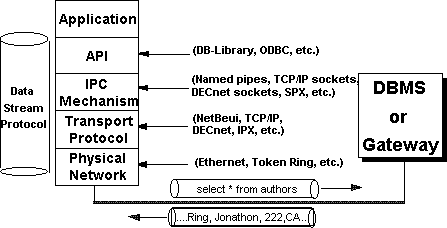
When thinking about the problems involved in accessing heterogeneous databases, it is useful to consider the problems at different levels. Figure 1 identifies some of the levels and interfaces encountered when accessing data in a client/server environment.
Figure 1. Levels and interfaces in a client/server environment
Some of the areas that need to be addressed when attempting to access heterogeneous databases are application programming interfaces (APIs), data stream protocols, interprocess communication (IPC) mechanisms, network protocols, system catalogs, and structured query language (SQL) syntax.
Each back-end database typically has its own application programming interface (API), through which it communicates with clients. A client application that must access multiple back-end databases therefore requires the ability to transform requests and data transfers into the API interface supported by each back-end database it needs to access.
Each DBMS uses a data stream protocol that enables the transfer of requests, data, status, error messages, and so on between the DBMS and its clients. Think of this as a "logical" protocol. The API uses interprocess communication (IPC) mechanisms supported by the operating system and network to package and transport this logical protocol. The Microsoft® SQL Server data stream protocol is called Tabular Data Stream (TDS). Each database's data stream protocol is typically a proprietary one that has been developed and optimized to work exclusively with that DBMS. This means that an application accessing multiple databases must use multiple data stream protocols.
Depending on the operating system and network it is running on, different interprocess communication (IPC) mechanisms might be used to transfer requests and data between a DBMS and its clients. For example, Microsoft SQL Server on OS/2® uses named pipes as its IPC mechanism, SYBASE® SQL Server on UNIX® uses transmission control protocol/internet protocol (TCP/IP) sockets, and SYBASE on VMS® uses DECnet® sockets. Microsoft SQL Server for Windows NT can use multiple IPC mechanisms simultaneously, including named pipes, TCP/IP sockets, SPX, and Banyan® Vines®. The choice of IPC mechanism is constrained by the operating system and network being used, and it is therefore likely that multiple IPC mechanisms will be involved in a heterogeneous environment.
A network protocol is used to transport the data stream protocol over a network. It can be considered the "plumbing" that supports the IPC mechanisms used to implement the data stream protocol, as well as supporting basic network operations such as file transfers and print sharing. Popular network protocols include NetBEUI, TCP/IP, DECnet, and SPX/IPX.
Back-end databases can reside on a local-area network (LAN) that connects it with the client application, or they can reside at a remote site, connected via a wide-area network (WAN) and/or gateway. In both cases, it is possible that the network protocol(s) and/or physical network supported by the various back-end databases are different from that supported by the client or each other. In these cases, a client application must use different network protocols to communicate with various back-end databases.
A relational database management system (RDBMS) uses system catalogs to hold metadata (information about the data being stored). Typically, system catalogs hold information about objects, permissions, data types, and so on. Each RDBMS product has an incompatible set of system catalogs with inconsistent table names and definitions. Many client tools and applications use system catalog information for displaying or processing data. For example, system catalog information can be used to offer a list of available tables, or to build forms based on the data types of the columns in a table. An application that makes specific reference to the SQL Server system catalog tables will not work with another RDBMS such as DB2® or Oracle®.
Structured query language (SQL) is the standard way to communicate with relational databases. In a heterogeneous environment, two main problems arise with respect to SQL syntax and semantics. First, different database management systems can have different implementations of the same SQL functionality, both syntactically and semantically (for example, data retrieved by a SQL statement might be sorted using ASCII in one DBMS and EBCDIC in another; or the implementation of the UNION operator in different database management systems might yield different result sets). Second, each implementation of SQL has its own extensions and/or deficiencies with respect to the ANSI/ISO SQL standards. This includes support for different data types, referential integrity, stored procedures, and so on. An application that needs to access multiple back-end databases must implement a lowest common denominator of SQL, or it must determine what back-end it is connected to so that it can exploit the full functionality supported.
When thinking about heterogeneous database access issues, it is helpful to classify possible solutions into three classes: the common interface approach, the common gateway approach, and the common protocol approach, as defined by Richard Hackathorn in his article "Emerging Architecture for Database Connectivity" in InfoDB, January 1991.
A common interface architecture, shown in Figure 2, focuses on providing a common API at the client side that enables access to multiple back-end databases. Client applications rely on the API to manage the heterogeneous data access issues discussed earlier. Typically, a common API would load back-end–specific drivers to obtain access to different databases.
An example of a common interface architecture is Microsoft Open Database Connectivity (ODBC), discussed later in this article.
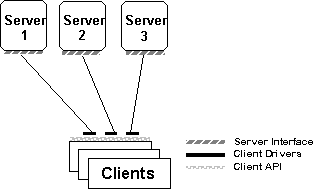
Figure 2. Common interface architecture
A common gateway architecture, shown in Figure 3, relies on a gateway to manage the communication with multiple back-end databases.
An example of a common gateway architecture is found in a gateway based on Microsoft Open Data Services, discussed later in this article.
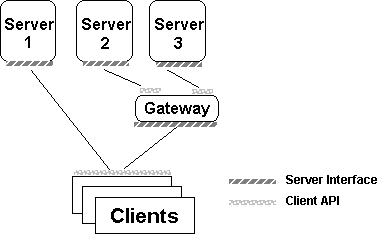
Figure 3. Common gateway architecture
In his book Introduction to Database Systems, C.J. Date states: ". . . there are clearly significant problems involved in providing satisfactory gateways, especially if the target system is not relational. However, the potential payoff is dramatic, even if the solutions are less than perfect. We can therefore expect to see gateway technology become a major force in the marketplace over the next few years." (page 635)
The common protocol approach, shown in Figure 4, focuses on a common data protocol between the client and server interfaces. Conceptually, this is perhaps the most elegant way of addressing the problem of heterogeneous data access.
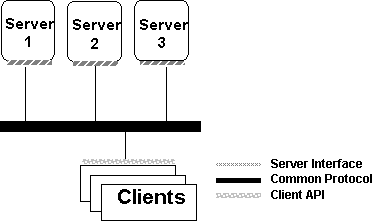
Figure 4. Common protocol architecture
Two common data protocol architectures are the proposed ANSI/ISO Relational Data Access (RDA) standard, and the IBM® Distributed Relational Database Architecture (DRDA™). Both of these architectures are in their infancy, and it is too early to determine how well they will function as commercial products.
It is important to note that these approaches to enabling heterogeneous database access are not exclusive. For example, an ODBC driver might connect through an Open Data Services gateway to a back-end database. Alternatively, an ODBC driver or Open Data Services gateway that "speaks" DRDA or RDA is possible.
We have looked at the basic issues involved in accessing heterogeneous databases, and generalized ways of approaching solutions. We will now look at specific connectivity products from Microsoft that enable heterogeneous data access. The SQL Server building blocks to data access—Tabular Data Stream (TDS) and the Net-Library® architecture—are an integral part of products enabling connectivity to heterogeneous databases. We then discuss Microsoft ODBC, Microsoft Open Data Services, and Microsoft SQL Bridge, and we address some of the ways in which Open Data Services and ODBC work together. Finally, we make recommendations to help you decide which API, DB-Library® or ODBC, to use when developing client applications.
Tabular Data Stream (TDS) and Net-Library are part of the core SQL Server technology that Microsoft connectivity products build on to integrate SQL Server–based applications into heterogeneous environments. Figure 5 shows how TDS and Net-Library fit into the client/server architecture of SQL Server–based applications.
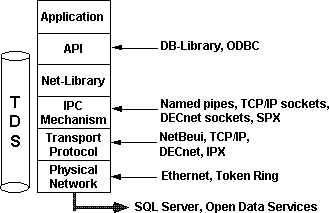
Figure 5. SQL Server building blocks
TDS is the data stream protocol that SQL Server uses to transfer requests and responses between client and server. Because TDS can be considered as a logical data stream protocol, it needs to be supported by a physical network IPC mechanism; this is where the Net-Library architecture comes in. A DB-Library application makes calls to the generic Net-Library interface. Depending on which Net-Library is loaded, communication with SQL Server is achieved using named pipes, TCP/IP sockets, DECnet sockets, SPX, and so on.
The Net-Library architecture provides a transparent interface to DB-Library and a method of sending TDS across a physical network connection. Net-Libraries are linked in dynamically at run time. With the Microsoft Windows™, Windows NT, and OS/2 operating systems, Net-Libraries are implemented as dynamic-link libraries (DLLs), and multiple Net-Libraries can be loaded simultaneously. With the MS-DOS® operating system, Net-Libraries are implemented as terminate-and-stay-resident (TSR) programs and only one can be loaded at any given time.
Note The SQL Server Driver for ODBC also uses Net-Libraries and the TDS protocol to communicate with SQL Server and Open Data Services.
Open Database Connectivity (ODBC) is a database connectivity API based on the SQL Access Group's Call Level Interface (CLI) specification. The SQL Access Group is a consortium of leading hardware and software database vendors. ODBC is an open, vendor-neutral API that enables applications to access heterogeneous databases. ODBC takes the "common API" approach, discussed earlier, to achieving heterogeneous data access.
The ODBC architecture consists of three components:
The Driver Manager and driver appear to an application as one unit that processes ODBC function calls.
Figure 6 shows the components of the ODBC architecture.
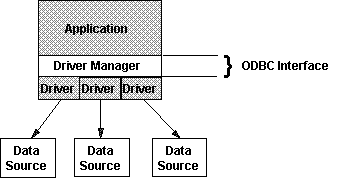
Figure 6. The ODBC model
Each ODBC driver supports a set of core ODBC functions and data types and, optionally, one or more extended functions or data types, defined as extensions:
ODBC can be used in different configurations, depending on the database being accessed. It can be used in one-, two-, or three-tiered implementations.
Figure 7 shows a one-tiered implementation. The database being accessed is a file and is processed directly by the ODBC driver. The driver itself contains the functionality to parse a SQL request, because a flat file is not able to do this. An example of a one-tiered implementation is a driver that manipulates an xBase file.
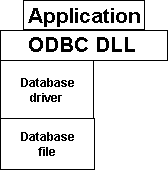
Figure 7. One-tiered drivers
Figure 8 shows a two-tiered configuration. The driver sends SQL statements to a server that processes the SQL requests. The application, driver, and Driver Manager reside on one system, and the software that controls access to the database typically resides on another system. An example of a two-tiered configuration would be accessing a SQL Server from a client on the LAN.
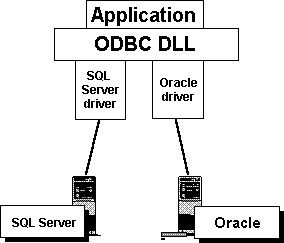
Figure 8. Two-tiered drivers
Figure 9 shows a three-tiered configuration. The ODBC driver passes requests to a gateway instead of a DBMS, and then the gateway process sends the requests to the database. An example of a gateway process involved in a three-tiered configuration is an Open Data Services–based gateway that supports access to DEC® RDB or IBM DB2 databases.
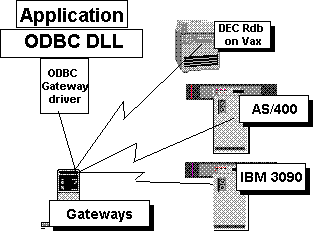
Figure 9. Three-tiered drivers
ODBC drivers for Microsoft SQL Server and Open Data Services are included in the SQL Server product. These drivers use the Net-Library architecture and the TDS protocol to access Microsoft and SYBASE SQL Servers, Microsoft SQL Bridge, and Open Data Services–based gateways and applications. The ODBC driver conforms to Level 1 APIs and implements many of the Level 2 APIs as well.
For more information about ODBC, see the Microsoft ODBC Software Development Kit (SDK) Programmer's Reference.
Microsoft Open Data Services is a server-side development platform that provides application services to complement the client-side APIs discussed earlier. Open Data Services provides the foundation for multithreaded server applications to communicate with DB-Library or ODBC clients over the network. When the client application requests data, Open Data Services passes the request to user-defined routines, and then routes the reply back to the client application over the network. The reply looks to the client as if the data were coming from SQL Server. Figure 10 illustrates how Open Data Services integrates into an enterprise.
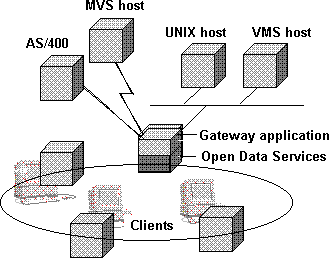
Figure 10. Open Data Services and an enterprise
Open Data Services is a server-based library that can receive, break apart, reform, and send TDS packets from many simultaneous clients. It uses the native multithreading facilities of the underlying operating system to handle simultaneous requests in a fast, memory-efficient way. The Open Data Services developer need only focus on the actions required to respond to individual requests; Open Data Services and the operating system handle and schedule multiple simultaneous requests.
Open Data Services is also used to develop extended stored procedure DLLs for use with Microsoft SQL Server for Windows NT.
The classic application for Open Data Services is a server-based gateway to another relational database—one that can handle any ad hoc SQL request from a DB-Library or ODBC client. Database Gateway from Micro Decisionware®, for example, implements a general-purpose gateway into DB2. It receives SQL requests from SQL Server clients on the LAN and forwards them to the mainframe for processing against a DB2 database. Because the results it then returns to the client look exactly like a results set from SQL Server, the client applications can handle the data in the same way. A component that understands the SQL language and can act on SQL requests is essential to the operation of a general-purpose gateway. This SQL interpreter usually resides in the back-end database itself (as is the case with DB2), but it can also be implemented in the gateway.
Not all data server applications need to understand and respond to SQL requests (for example, a data server application that returns the contents of a specific flat file as a results set). This type of application could be designed to respond to only one particular procedure call (such as GetFileA). The Open Data Services application would define the column names and the data types of the fields in the flat file, and then return the records in the file to the requesting client as rows of data. Because this results set would look exactly like a SQL Server results set, the client could process it.
Nearly any set of data values that needs to be shared on a network can be described in terms of rows and columns, so this capability is relevant to many LAN applications. In particular, specific data needed by LAN users is often maintained by an established application that does not use a relational database. Rather than attempting to move this entire application to a relational database, you can use an application-specific gateway to extract from the existing system the precise information required. This approach works when the information required from the existing system is well defined, not ad hoc in nature. For ad hoc queries, the better approach is to extract the data from the existing system and load it into a relational database.
Microsoft has developed the catalog stored procedure specification to address the problem of catalog incompatibilities between different DBMS products. Open Data Services gateways that support the catalog stored procedures will allow DB-Library–based applications to access these gateways and obtain catalog information about different back-end databases.
Note The problem of incompatible system catalog access is addressed in ODBC through the provision of API calls. The Microsoft catalog stored procedures map to these ODBC API calls, supporting the access of Open Data Services gateways by ODBC clients.
The implementation of the catalog stored procedures will vary, based on the underlying DBMS being accessed by the Open Data Services–based gateway. For example, in the case of SQL Server, an actual stored procedure definition has been written for each catalog stored procedure; the DB2 Gateway from Micro Decisionware implements these stored procedures as CICS transactions in the host environment; and a gateway that accesses Oracle could implement the catalog stored procedures as PL/SQL code, executed by the gateway itself.
The main advantages to be gained by a DB-Library client application using the stored procedure interface instead of accessing the system catalogs directly are:
There are limitations to the catalog stored procedures. In particular, they do not synthesize all information present in the system catalogs for every possible gateway target, nor are they intended to replace the system catalogs in SQL Server or any other DBMS product. A client application, such as a database administration tool, that uses all information unique to a particular server must use the underlying system catalogs. On the other hand, the catalog stored procedures represent the general information that most "generic" database front-ends need in order to interact with a particular database.
The following table lists the catalog stored procedures and gives a brief description of the information returned:
| Stored Procedure | Description |
| sp_column_privileges | Returns column privilege information for a single table in the current DBMS environment. |
| sp_columns | Returns column information for single objects that can be queried in the current DBMS environment. |
| sp_databases | Lists databases present in the SQL Server installation or accessible through a database gateway. |
| sp_datatype_info | Returns information about data types supported by the current DBMS environment. |
| sp_fkeys | Returns logical foreign key information for the current DBMS environment. |
| sp_pkeys | Returns primary key information for the current DBMS environment. |
| sp_server_info | Returns a list of attribute names and matching values for SQL Server or for the database gateway and/or underlying data source. |
| sp_special_columns | Returns the optimal set of columns that uniquely identify a row in the table and columns that are automatically updated when any value in the row is updated by a transaction. |
| sp_statistics | Returns a list of all indexes on a single table. |
| sp_stored_procedures | Returns a list of stored procedures in the current DBMS environment. |
| sp_table_privileges | Returns table privilege information for a single table in the current DBMS environment. |
| sp_tables | Returns a list of objects that can be queried in the current DBMS environment. |
For more information, see the Microsoft SQL Server 4.2 Language Reference, or the Microsoft SQL Server for Windows NT Transact-SQL Reference, where the catalog stored procedures are described in detail.
The power and versatility of Open Data Services leads to the question, How difficult is it to implement an Open Data Services–based application? The vast range of application possibilities with Open Data Services makes it impossible to give an estimate, because the scale of complexity varies greatly. In general, however, the potential complexity of developing Open Data Services–based applications lies in the target environment. The Open Data Services API is small and easy to use. Implementing simple user-defined functionality, such as an auditing or logging function, is a straightforward exercise. However, if you are developing a gateway to a host database, complexity is introduced through the need to understand the communication environment with the host, and the level of generality required in the gateway. A full-featured gateway to a host database would need to implement a sophisticated parser, map data types, translate syntactic differences between SQL implementations, and so on.
In summary, the Open Data Services library provides a very simple foundation on which to implement multithreaded server applications. The client interface, data stream protocol, thread management, and multiuser support is provided by Open Data Services and DB-Library or the SQL Server ODBC driver. The requirements of the user-defined portion of the server application define the level of difficulty. Figure 11 illustrates how the complexity of Open Data Services applications is dependent on the scope of the application.
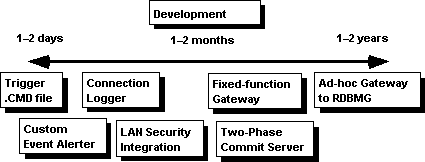
Figure 11. Building Open Data Services applications
For more information about Open Data Services, see the technical note Microsoft Open Data Services: Application Sourcebook.
Microsoft SQL Bridge is designed to provide interoperability between Microsoft and SYBASE environments by linking databases, clients, and gateways across UNIX, VMS, Macintosh®, and PC networks.
Figure 12 shows how SQL Bridge works.
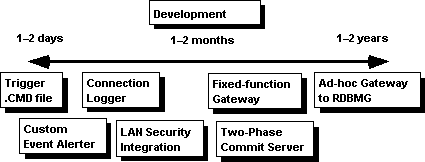

Figure 12. SQL Bridge and multiple environments
SQL Server for the OS/2 operating system can “listen” for client connections using only named pipes. In order for clients using other protocols (such as TCP/IP sockets) to connect to SQL Server, the client requests must go through SQL Bridge. SQL Bridge accepts the socket (or other IPC) requests from the clients, and passes those requests on to SQL Server using named pipes. It receives named pipes requests from SQL Server, and passes those on to the clients using sockets (or other IPC). In addition, it allows Microsoft SQL Server clients using native network protocols and IPC methods to access SYBASE SQL Servers using sockets and TCP/IP.
SQL Server for Windows NT has multi-protocol support built in, enabling it to listen for client connection on many different protocols, such as named pipes, TCP/IP sockets, IPX/SPX, and Banyan VINES SPP. Therefore, SQL Bridge is not necessary for clients using those protocols to communicate with SQL Server for Windows NT. In this environment, SQL Bridge is primarily useful for Microsoft SQL Server clients to use native network protocols and IPC methods to access SYBASE SQL Servers using sockets and TCP/IP. This eliminates the need to purchase, load, and configure multiple network protocols and Net-Libraries for each client.
Interoperability between Microsoft and Sybase environments is enabled in three areas:
This two-way interoperability allows you to mix clients and servers for more efficient information exchange, without requiring a common network protocol across different networks and without installing multiple protocols and Net-Libraries on every client.
Microsoft SQL Bridge is a server application based on Open Data Services; it can be thought of as a "protocol router." SQL Bridge uses the Net-Library architecture to support the IPC mechanisms used by SQL Server running on the OS/2, Windows NT, UNIX, or VMS platforms. Each instance of SQL Bridge "listens" for TDS messages from clients using a particular IPC mechanism (named pipes, TCP/IP sockets, DECnet sockets), and then routes the TDS message to SQL Server using a potentially different IPC mechanism. Results are received from SQL Server, translated to the client IPC protocol, and sent to the client.
The use of SQL Bridge in environments where communication is required between Microsoft and SYBASE clients and servers can greatly reduce cost and maintenance overhead, as well as free up resources on each client because it is not necessary to load multiple network protocols and Net-Libraries. SQL Bridge is a highly efficient application and does not incur the overhead usually associated with the word "gateway." Its only function is to "listen" for TDS messages coming in and to reroute them using a different IPC mechanism. Because SQL Bridge uses the Net-Library architecture to support the various IPC mechanisms, it can be configured and extended.
An example of running multiple instances of SQL Bridge is shown below (Figure 13).
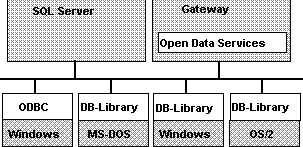
Figure 13. Using multiple instances of SQL Bridge
You can configure and run multiple instances of SQL Bridge. Each instance is a separate gateway that runs as a separate process on a single Windows NT–based computer, and each is identified by a logical instance name. Each instance can listen on multiple Net-Libraries for client connections but can connect to only a single SQL Server. You must configure at least one instance to use SQL Bridge.
This section gives general guidelines to follow when developing applications for enterprise database connectivity using Microsoft SQL Server and the Microsoft database connectivity products discussed in the previous section.
With the availability of the ODBC and DB-Library APIs for accessing SQL Server and Open Data Services–based applications, the question arises as to which API to use. Following are some general guidelines.
ODBC is appropriate for:
ODBC is the Microsoft strategic direction for access to relational databases from the Windows platform. New Windows-based client/server applications should use ODBC as their database access API. In the future, Microsoft will also support ODBC on the Macintosh and other platforms.
ODBC was designed as an API for heterogeneous database access, and so offers some key functionality over DB-Library. Two key factors that differentiate ODBC are:
ODBC enables easy access to local data such as xBase or Paradox®.
DB-Library is appropriate for:
Existing DB-Library applications do not have to be rewritten using ODBC. DB-Library will continue to be supported. Open Data Services and Microsoft catalog stored procedures open up heterogeneous data access to existing DB-Library applications.
Currently, only Windows-based applications can use the ODBC API. An application that also requires client support for MS-DOS and/or OS/2 should use DB-Library. DB-Library is also equivalent to the SYBASE Open Client interface on UNIX, VMS, and Macintosh systems.
An application that is specifically tied to SQL Server, such as a bulk data loader, should be built with DB-Library.
In a number of instances, applications will be able to access a back-end database through a direct-connect (two-tiered) ODBC driver loaded at the workstation, or by connecting to an Open Data Services–based gateway using ODBC or DB-Library (a three-tiered solution). If the database involved resides on the same local-area network as the application and uses the same network protocol, the choice obviously will be to use a two-tiered ODBC driver. However, when access to the database is complicated by different network protocols, wide-area network, and so on, it is beneficial to consider using a gateway.
ODBC and Open Data Services can integrate well in three-tiered configurations to solve enterprise-wide data access issues. Consider using the Open Data Services ODBC driver and a single network protocol at the client in the following cases:
Figure 14 illustrates a LAN with applications using both DB-Library and ODBC to connect to SQL Server and Open Data Services-based gateways.
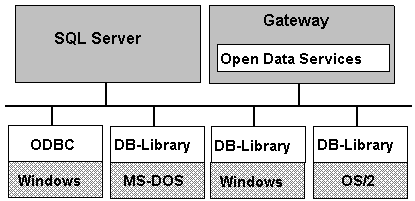
Figure 14. Applications using DB-Library or ODBC to connect to SQL Server and Open Data Services
To enable applications that work the same across different back-end databases, ODBC–based applications should use the ODBC system catalog APIs when retrieving information from system catalogs. DB-Library–based applications that access Open Data Services–based gateways should use Microsoft catalog stored procedures instead of issuing queries that directly access system tables.
The decision as to whether to use "generic" SQL that is common to all databases being accessed, or to "sense" the back-end being accessed and make use of SQL extensions such as stored procedures, depends on the type of application being developed.
The decision on the level of "generic" versus "specific" SQL to use depends, among other things, on:
If you use ODBC as the client API, you can rely on the ODBC driver to take care of some of the differences in SQL syntax and semantics. Each ODBC driver supports at least one or two sets of SQL statements:
In addition to the core and minimum sets, ODBC defines SQL syntax for data literals, outer joins, and SQL scalar functions. The core and minimum sets of SQL statements supported by ODBC do not restrict the set of statements that can be supported. A driver can support additional syntax that is unique to the associated data source; this is referred to as extended functionality.
The following table provides guidelines for selecting a functionality set to match the functionality and interoperability needs of an client application developed using ODBC.
| To communicate with | Choose |
| Single-tiered and multiple-tiered drivers, with maximum interoperability and the least amount of application work. | Minimum functionality. All drivers support core ODBC functions and minimum SQL statements. |
| Single-tiered and multiple-tiered drivers, with maximum interoperability and maximum functionality. | Check before you issue core or extended functions. If supported, use them. If not, perform equivalent work using minimum functions. |
| Single-tiered drivers. | Minimum functionality. |
| Multiple-tiered drivers only, with maximum interoperability and least amount of application work. | Core functionality. |
| Multiple-tiered drivers only, with maximum interoperability, maximum functionality, and maximum performance. | Extended functionality. Check functions and, if not available, perform equivalent work using core functions. |
If you use DB-Library as the client API and access heterogeneous data sources through Open Data Services–based gateways, you cannot rely on the client API to resolve SQL syntax and semantic incompatibilities. Instead, the system catalog stored procedures specification and the gateways themselves provide some aid in addressing incompatible SQL syntax and semantics.
The system catalog stored procedures allow transparent catalog access, as well as the ability to query a back-end data source about support for specific functionality.
When using DB-Library and Open Data Service–based gateways to access heterogeneous data sources, read the documentation for the gateway(s) that you will be accessing to identify features supported, SQL mapping transformed, unsupported features, and so on.
This technical article has addressed some of the issues involved in enabling client/server applications to access enterprise data stored in a wide variety of heterogeneous databases. The database connectivity products from Microsoft—ODBC, Open Data Services, and SQL Bridge—enable client/server applications in general, and those built around Microsoft SQL Server in particular, to access to these important databases.
Date, C.J. An Introduction to Database Systems, Volume 1 (5th edition). Addison-Wesley, 1990.
Hackathorn, Richard. "Emerging Architectures for Database Connectivity." InfoDB, January 1991.
“Microsoft Open Data Services: Application Sourcebook.” MSDN Library, Technical Articles.
Moffatt, Christopher. "Microsoft SQL Server Network Integration Architecture." MSDN Library, Technical Articles.
Narayanan, Suriya. "Maximizing Performance Using Binary Columns and Bitwise Operations in Microsoft SQL Server for Windows NT." MSDN Library, Technical Articles.
"Query Optimization Techniques." MSDN Library, Technical Articles.
Schroeder, Gary. "Backup and Recovery Guidelines for Microsoft SQL Server." MSDN Library, Technical Articles.
To receive more information about Microsoft SQL Server, or to have other technical notes faxed to you, call Microsoft Developer Services Fax Request at (206) 635-2222.