 To create a remote login
The RemoteLogin object exposes the properties of a single login mapping record for connections to a Microsoft® SQL Server™ installation originating from another, known SQL Server installation.
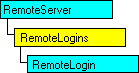
A SQL Server installation can maintain authentication information for connections originating from other SQL Server installations. Server-originated connections are attempted when, for example, remote procedure calls are part of a Transact-SQL script.
Each SQL Server installation in an organization can control access by listing the servers it accepts connections from. For each of these remote servers, login-identifier mappings specify the local login used by a remote server connection when that remote server connects as part of a process run by the remote login.
With the RemoteLogins collection, you can:
To create a remote login
To remove a remote login
oRemoteServer.RemoteLogins.Remove("stevenb")
When using the Item or Remove method, the RemoteLogins collection supports member identification using either name or ordinal reference syntax. For example:
Set oRemoteLogin = oRemoteServer.RemoteLogins("stevenb")
Or:
Set oRemoteLogin = oRemoteServer.RemoteLogins(2)
Note Creating or removing remote server login mappings by using the RemoteLogins collection requires appropriate privilege. The SQL Server login used for SQLServer object connection must be a member of the fixed role securityadmin or a role with greater privilege.
| Add Method | Remove Method (Collections) |
| Item Method |